AI changed classwork almost overnight. A student can paste a prompt and get a polished answer in seconds, and teachers are left wondering whose thinking they are grading. Many schools are responding the same way: more work back on paper, fewer screens during class.
Moneyling™ has you covered either way. Every worksheet in our courses prints cleanly for pencil-and-paper work, and the same worksheet is completely available electronically as a fillable PDF in the Moneyling™ LMS, Google Classroom (Add-on), Moodle, Schoology, and district LMS platforms.
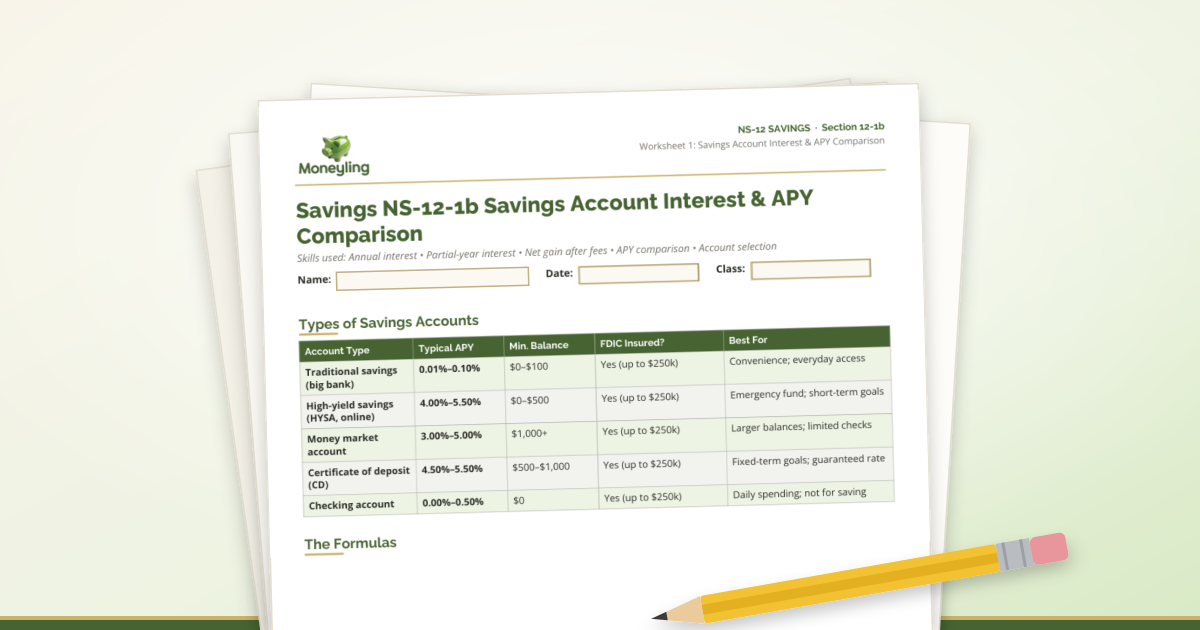
Take NS-12 Savings worksheet 12-1b, Savings Account Interest & APY Comparison. It is a branded, standards-labeled page with Name, Date, and Class fields, a comparison table of savings account types (traditional savings, high-yield savings, money market, CDs, and checking), and the formulas students use for annual interest, partial-year interest, net gain after fees, and APY comparison. Print a class set, or let students type straight into the fillable fields—same page, same standards.
You choose the mode by the day, the unit, or the student. The platform does not choose for you.
Why paper is coming back
When practice happens on paper, in the room, you can see each student work through the problem: the formula they picked, the numbers they plugged in, and where they got stuck. That is hard for an AI tool to fake.
Paper also helps when devices are shared, Wi-Fi is spotty, or your building has tightened screen-time and phone policies. Financial education should not depend on whether the Chromebook cart showed up.
Print-ready by design
Moneyling™ worksheets are built to look right on paper: clear headers with the National Standards section (for example, NS-12 Savings 12-1b), clean tables, and the formulas students need right on the page.
Download the PDF from the lesson, print what you need, and teach. No reformatting, no copying and pasting into a new document.
Still completely digital when you want it
The same worksheets are fillable PDFs, so students can type answers directly, save, and submit through the Moneyling™ LMS or the platform your school already uses.
Auto-graded quizzes, dashboards, and progress tracking stay in the LMS. Many teachers do the thinking on paper and the check for understanding online.
A classroom routine that holds up to AI
Try this rhythm: introduce the story beat on the whiteboard, have students complete the worksheet by hand in class with their work shown, then close with a short LMS quiz or a written SMART goal.
For more on designing lessons that reward process over copy-paste, see our post on students using AI: https://www.moneyling.org/blog/educator-ai-guardrails-financial-literacy-process-over-policing. For whiteboard, packet, and fully digital options, see https://www.moneyling.org/blog/educator-hybrid-pen-paper-whiteboard-lessons.